
Keyed Visual Version Guide
Here are some facts about obtaining a keyed version of our visuals:
- You must already have an active organizational license and a verified bizintelligencechampions.com account to obtain a keyed visual.
- We only offer keying for select visuals.
- The place to start requesting a keyed visual is "Keyed Visual Request", found on the buy page.
- Keyed visuals are included with an active organizational license, at no charge. Request one per visual, per version - there's no limit and nothing to buy.
- A keyed visual is specially built for you - it includes your identity, and it should not be shared outside your organization.
- The custom visual is built from the same code base as the publicly available visual (in AppSource), but it is not Power BI Certified - it uses external data access to validate that you have an active organizational license key tied to your bizintelligencechampions.com account.
- Keyed visuals are not guaranteed to be supported in all cloud environments (eg. DOD), so we recommend requesting one and testing it in your preferred environment before you rely on it. Requests are free, so it costs you nothing to check.
- Because the keyed versions are not Power BI Certified, they have the same limitations as other non-certified visuals.
- The visual you receive will not auto-update as new versions are released: you can choose if/when you request keyed binaries for a newer version.
- The visual you receive is well suited to be added to your Power BI Organizational visuals tenant repository.
- If your organizational license key expires, reports that use the visual will start to show a watermark indicating that your license is no longer valid.
- Note: going to your visual's settings, the License Key setting will show the expiry date for your most recent organizational license.
- As long as your organizational license stays active on the same account that you generated the keying request from — whether it renews automatically on a subscription or you purchase a further fixed term — reports continue to function based on the new expiry date, without having to update reports with a new key.
- The process starts with a request on your part, and the rest is automatic: your visual is built for you and emailed to you, usually within a few minutes. It's also available for download on your Account page (under Keys). If something goes wrong with the build we'll email you about that too, rather than leave you waiting.
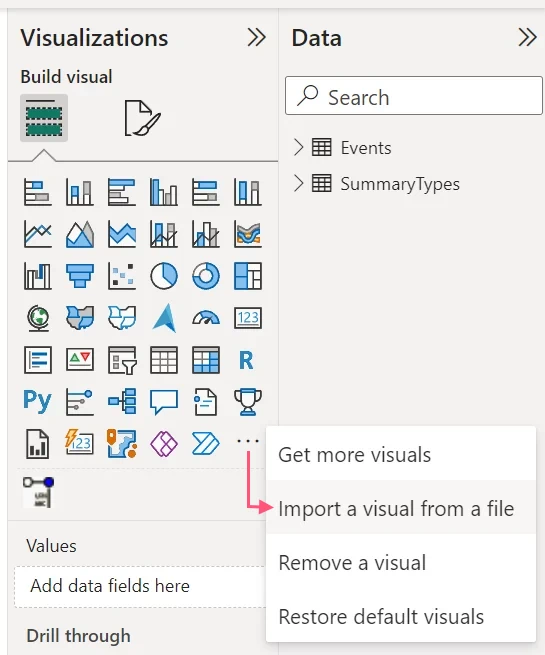
The binaries you receive are a pbiviz file that can be imported into Power BI using this option:
Frequently Asked Questions
- Is the loading performance the same as the certified version of the visual?
There's a small lag on loading while the visual checks your license status. If you feel there are issues here, feel free to open a support ticket. - When I import the keyed visual into a report that I previously built with an AppSource (public) version, does it update all visuals of that type throughout the report?
No. You will need to update the visuals to the new (keyed) type. (It is considered a different visual.) - When I import the keyed visual into a report that I previously built with an earlier keyed version, does it update all visuals of that type throughout the report?
Yes. The report identifier stays the same for your custom built visual, so this works as expected. - I forgot my bizintelligencechampions.com login but I want to extend my organizational license. What can I do?
Try the password reset option, and the suggestion is to generally use a shared email address for your account. (If you're using a personal one and you leave your organization, other people may not be able to renew the organizational license.) Worst case: you may need to create a new account, purchase an organizational key on it, request your keyed visuals again (they're free), and update your reports to use the new keyed visual. - Can I get updated versions for keyed visuals?
You can request new versions, at your discretion. This is treated as a new keying request, and like every keying request it's free with an active organizational license - there's no limit, and nothing to buy. Start one on the buy page. We often send email updates about releases of our public versions, so that's one way to stay on top of when you might want to get a new keyed version.